
IPTV stands for Internet Protocol Television. Put simply, it delivers live television and on-demand video as data over an IP network instead of sending a conventional broadcast signal through an aerial, satellite dish or cable-TV connection. To use it, you normally need reliable broadband, a compatible device, a player app and valid access details from a service provider. This guide explains what is IPTV, the technology behind it and what viewers should check before using IPTV services for viewers in Ireland.
What does IPTV stand for?
IPTV is short for Internet Protocol Television. Internet Protocol, usually abbreviated to IP, is the set of networking rules used to address and move data between connected devices. With IPTV, television pictures and sound are converted into digital packets and transported across an IP-based network.
The International Telecommunication Union’s IPTV definition is more specific than the way people commonly use the term. It describes IPTV as multimedia delivered over managed IP networks designed to support quality, security, interactivity and reliability.
In everyday conversation, however, people often use “IPTV” more broadly for television delivered through a broadband connection. That can include managed services from telecommunications companies as well as services delivered over the public internet. The common feature is the delivery method: video reaches the viewer in IP data packets.
How does IPTV work?
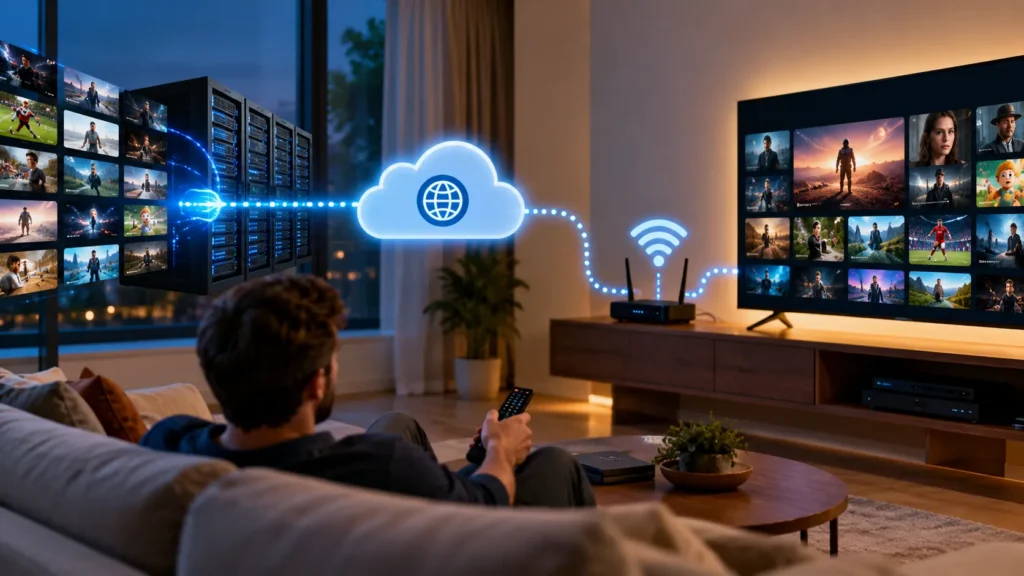
IPTV works by preparing a television or video source for digital delivery, sending the requested stream across an IP network and decoding it on the viewer’s device. The process happens in seconds, but several systems are involved behind the screen.
1. The provider receives and prepares the video
A service begins with a video source. This may be a live broadcast, a studio feed or a stored on-demand programme. The provider must have the necessary permission to distribute that content; IPTV technology by itself does not establish content rights.
The source is encoded into a digital video format suitable for network delivery. Encoding compresses the video so it can travel efficiently without sending the enormous amount of raw data produced by a camera or broadcast feed.
2. The stream is organised for delivery
The encoded video is packaged for the delivery system. A platform may also associate it with channel information, programme-guide data, subtitles, account permissions and playback controls.
Live television and on-demand video do not always travel in exactly the same way. A live channel must arrive continuously as the programme is happening. An on-demand title is requested individually and can usually be paused, resumed or restarted.
3. Your app requests a channel or programme
When you select something to watch, the IPTV app sends a request through your internet connection. The platform checks whether the account is valid and whether the requested content is available to that account.
For an individual internet stream, the server generally sends a separate session to the viewer. On managed networks, providers may also use multicast technology for live television, allowing network equipment to distribute one source stream efficiently to several authorised receivers. The APNIC explanation of IPTV delivery provides a more technical comparison of multicast and unicast systems.
4. Small sections of video are buffered
Your app normally stores a short section of incoming video before showing it. This is the buffer. It helps smooth out small variations in delivery time, but it cannot compensate indefinitely for weak Wi-Fi, an overloaded connection, device limitations or a problem elsewhere in the delivery chain.
5. Your device decodes and displays the picture
Finally, the player decodes the compressed stream into pictures and sound. The result appears much like ordinary television, even though it arrived as network traffic rather than as a conventional broadcast signal.
What happens when you change an IPTV channel?
Changing channel causes the player to stop receiving one stream and request another. The platform authenticates the request, locates the new stream and begins sending data to the device. The player then buffers enough of the new stream to start playback.
This explains why an IPTV channel change may not feel identical to switching channels through an aerial. A short delay can occur while the new session starts and the buffer fills. The delay depends on the delivery system, app, device, network conditions and the way the stream is encoded.
What types of content can IPTV deliver?
IPTV is a delivery technology rather than a particular channel package. Depending on the provider and the rights attached to the service, an IPTV platform may support:
- Live television: programmes delivered as they are being broadcast.
- Video on demand: films or programmes selected from a library and started when the viewer chooses.
- Catch-up television: previously broadcast programmes made available for a limited period.
- Time-shifted viewing: features such as pause, restart or rewind, where supported.
- Electronic Programme Guide: schedule data showing what is on now and what is coming next.
Available content and features vary between services. Check the provider’s current information rather than assuming every app or subscription includes the same functions. Our channel and content overview explains the categories currently presented by IPTV Ireland.
What do you need to use IPTV?
Most viewers need five basic things: broadband, a supported device, a compatible player, valid subscription details and a stable home network.
A reliable broadband connection
Video must arrive continuously, so connection stability matters as much as the advertised maximum speed. Other people downloading files, playing online games or streaming simultaneously can reduce the bandwidth available to the television.
If you are comparing broadband plans, ComReg provides an independent broadband and mobile plan comparison service for consumers in Ireland. The speed required in practice depends on picture quality, compression, the number of simultaneous streams and other household activity.
A compatible viewing device
You do not necessarily need a dedicated IPTV box. Depending on the service and app, IPTV can work on:
- smart televisions;
- streaming sticks and television boxes;
- Android or iOS phones and tablets;
- Windows PCs and Macs;
- dedicated set-top boxes.
Device compatibility should be confirmed before purchasing a subscription. An app available on one television platform may not be offered on another.
An IPTV player or provider app
The player is the software that receives, organises and displays the stream. Some services provide their own application. Others supply legitimate account details that can be entered into a compatible third-party player.
Installing a player does not automatically provide television content. The app and the subscription are separate components unless the provider clearly states otherwise.
Valid access details
The provider may issue a username and password, a portal address, an M3U link or another supported login method. Treat those details like a password. Do not publish them, forward them to strangers or enter them into an untrusted app.
A stable connection between the router and device
A fast broadband package cannot fix weak Wi-Fi inside the home. Distance, walls, interference and router placement can affect the connection between the player and the router. Ethernet is often the most consistent option where a cable is practical, while well-configured Wi-Fi may be sufficient for many homes.
IPTV versus cable and satellite television
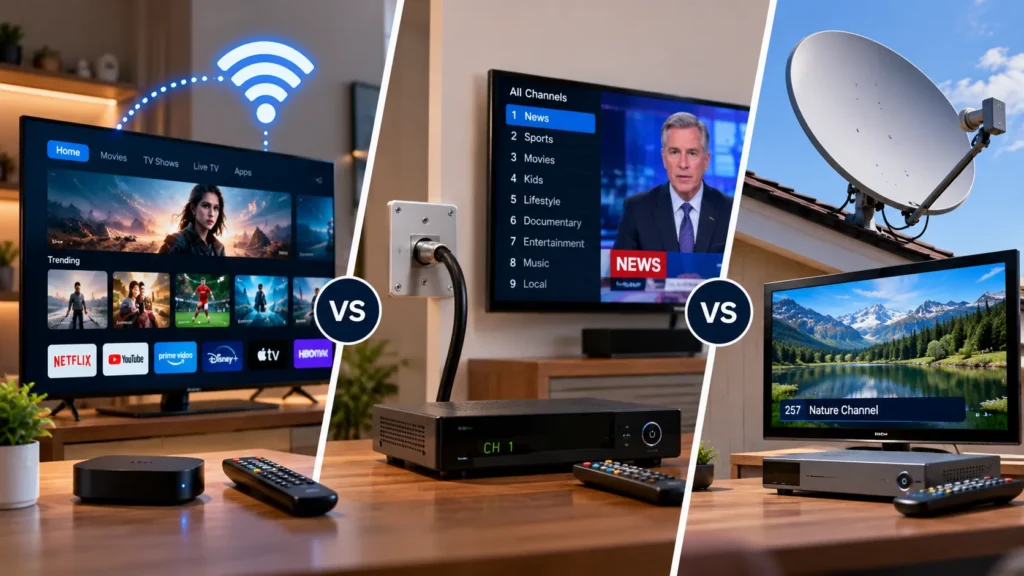
The main difference is the route used to deliver the picture.
| Feature | IPTV | Cable television | Satellite television |
|---|---|---|---|
| Delivery route | IP network or broadband connection | Operator’s cable network | Signal from a satellite dish |
| Main household requirement | Internet connection and compatible player/device | Cable connection and receiver | Dish, clear installation position and receiver |
| On-demand capability | Common, depending on the service | Depends on the operator | Depends on the operator and internet features |
| Device flexibility | Can support televisions, phones, tablets and computers | Usually centred on an operator box | Usually centred on a satellite receiver |
| Main dependency | Broadband and home-network stability | Cable-network availability | Dish installation and satellite reception |
Traditional television may broadcast many channels towards the home continuously. IPTV can request and deliver the selected stream through the network. Its two-way connection also makes interactive functions, account controls and on-demand requests easier to integrate.
Is IPTV the same as ordinary streaming?
The terms overlap, but they are not always identical. In strict technical usage, IPTV usually refers to a managed television service with controlled delivery and quality mechanisms. OTT, meaning “over the top”, sends video over the public internet independently of the viewer’s broadband provider.
Consumer language is less precise. Many people call any internet-delivered live television service IPTV, even when it uses the same type of public-internet delivery as other streaming apps. For a viewer, the practical questions are more important than the label: Is the service authorised, is the app compatible, does the connection support it and are the terms clear?
How do you start using IPTV?
The safe setup process is straightforward:
- Check the service carefully. Review its terms, privacy information, support details, device compatibility and content-authorisation claims.
- Confirm the device and connection. Make sure your television, streaming device, phone or computer supports the required app.
- Install software from an official source. Use the device’s recognised app store or the developer’s verified website.
- Enter the access details privately. Use only the credentials supplied for your own account.
- Load the guide and test playback. Check several streams and basic controls before relying on the setup.
- Ask for help when necessary. If authentication or configuration fails, use the provider’s official support channel rather than sharing credentials publicly. IPTV Ireland customers can use the contact and support page.
Advantages and limitations of IPTV
IPTV can combine live television, on-demand viewing and interactive controls in one interface. It can also work across different types of connected devices, making viewing less dependent on a single television socket or satellite receiver.
However, there are practical limitations:
- Playback depends on the broadband and home network.
- App quality and device compatibility vary.
- Live streams may have a delay compared with terrestrial broadcasts.
- A service can change its supported apps or channel availability.
- Not every service using IPTV technology has permission to distribute every item it offers.
- Account sharing or using untrusted apps can create privacy and security risks.
IPTV is therefore not automatically better or worse than cable or satellite television. The right choice depends on broadband quality, viewing habits, required devices, service transparency and lawful content availability.
Is IPTV legal?
IPTV technology is legal; it is simply a method of delivering television and video over an IP network. Legality depends on whether the provider has permission to distribute the content and whether the viewer uses the service consistently with applicable law and the service terms.
An app being available in an app store does not prove that every playlist loaded into it is authorised. Likewise, using a particular device or network technology does not establish content rights. Review the provider carefully and avoid services that cannot explain who operates them, what the terms are or how they handle copyright complaints. IPTV Ireland’s relevant information is available in its Terms of Service and DMCA Policy.
Frequently asked questions
Does IPTV require the internet?
IPTV requires an IP network. Consumer services are normally delivered through a broadband connection, although some professional IPTV systems operate inside private managed networks rather than across the public internet.
Do I need a Fire TV Stick or IPTV box?
Not necessarily. A compatible smart TV, phone, tablet or computer may run the required player directly. A streaming stick or box is useful when the television does not support the chosen app or when you prefer a separate device.
Is an IPTV player the same as an IPTV subscription?
No. A player is software that displays and organises streams. A subscription provides authorised access details and service content. Installing an empty player usually does not give you channels or on-demand programmes.
Is IPTV free?
Some broadcasters make authorised internet streams available without a separate charge, while commercial IPTV services generally require payment. Be cautious when an unknown source offers large amounts of premium content for free without explaining its rights or business identity.
Does IPTV always work on several devices at once?
Device compatibility and simultaneous viewing are different. A service may support many device types while allowing only one active stream per subscription. Check the provider’s terms before trying to watch on multiple screens simultaneously.
Conclusion
IPTV is television delivered through Internet Protocol networks. A provider prepares and encodes the video, the platform sends the requested stream, and an app or set-top box buffers, decodes and displays it. For the viewer, the essential requirements are stable broadband, compatible equipment, a trusted player and valid access details from an appropriately authorised service.
If you understand those building blocks, it becomes much easier to choose equipment, diagnose playback problems and assess a provider’s claims. You can review the current IPTV Ireland service information or compare the available subscription periods and prices before deciding what suits your setup.