
The best IPTV app is the one that matches your device, your provider’s login method and the way you watch television. For an Android TV, Google TV or Fire TV device, a remote-friendly player such as TiviMate may be a strong fit. Apple users may prefer an app designed for the Apple ecosystem, while Samsung and LG owners must choose from the apps available for their exact TV model and region. No player is best for everyone, and the app itself normally does not include channels. This guide explains how to compare IPTV players before using them with an authorised service such as IPTV Ireland.
What is an IPTV app?
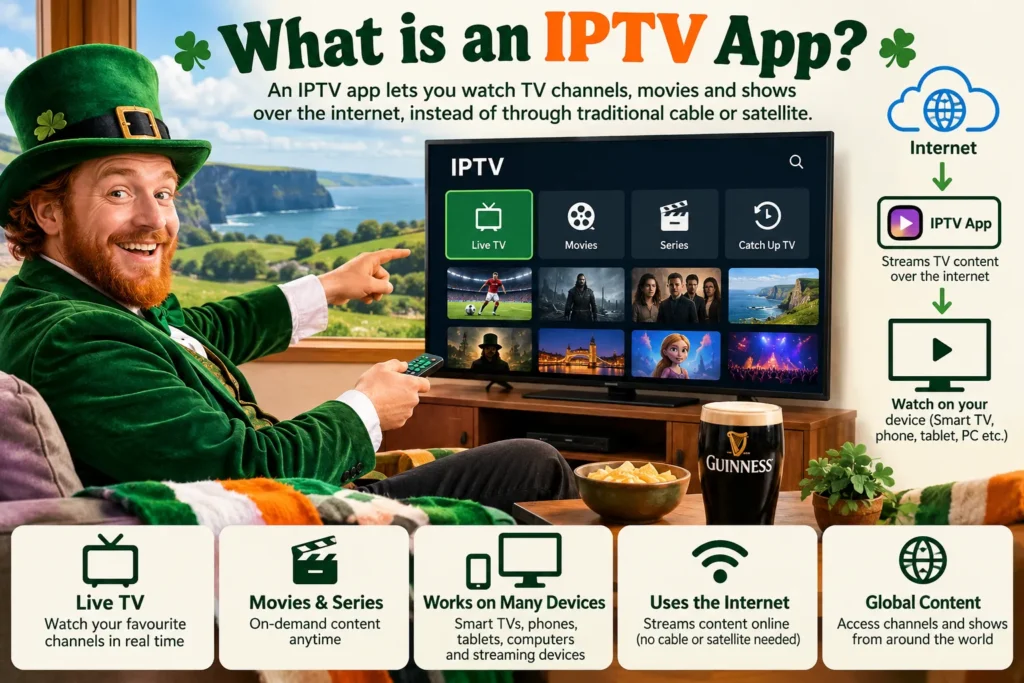
An IPTV app, also called an IPTV player, is software that receives, organises and plays streams supplied by a television service. It may display live channels, programme-guide data and on-demand sections, but only when the connected service provides them.
The player and the content service are separate parts of the setup:
- The IPTV player provides the interface, playback controls and device compatibility.
- The IPTV service supplies authorised access, account details and available content.
- The internet connection carries the stream to the device.
Installing an empty player does not create a television subscription. If these terms are new to you, read our guide to what IPTV is and how it works before comparing apps.
Which IPTV app is best for your device?
Start with the device on which you will watch most often. An excellent phone app may be frustrating on a television if it was designed for touch controls. Conversely, a polished television interface may not be available on an iPhone or laptop.
| Device or priority | Player type to consider | What to verify before installing |
|---|---|---|
| Android TV or Google TV | A television-first Android player such as TiviMate | App-store availability, remote navigation and supported login format |
| Amazon Fire TV | A remote-friendly Android/Fire TV player supported by the developer | Whether it is available through an official source for your Fire TV model |
| iPhone, iPad or Apple TV | An Apple-focused player such as IPTVX | Current device and operating-system requirements in the App Store |
| Samsung or LG smart TV | A player listed in the television’s own app store | Exact model, country, login support and activation terms |
| Windows PC | A verified Microsoft Store app or a trusted desktop media player | Developer identity, update history and playlist support |
| Several device types | A player with verified versions for every required platform | Whether settings or favourites synchronise and whether each version is genuine |
| Simple free setup | A reputable free player from an official store | Advertising, privacy disclosures and limitations of the free version |
This table is a starting point, not a guarantee. App availability, pricing and features can change. Always check the current listing on the device itself before paying for an activation or premium upgrade.
Best IPTV app for Android TV and Google TV
Android TV and Google TV users should prioritise an interface built for a television remote. Large programme-guide rows, clear focus indicators and quick access to favourites matter more in a living room than phone-style touch controls.
TiviMate’s official website identifies it as an IPTV player for Android TV devices. It is a common choice for people who value a traditional television-guide layout and extensive player controls. Before choosing it, confirm that your provider’s legitimate access method is supported and that the current version is compatible with your device.
TiviMate is not a content provider. A player may work perfectly while a stream, programme guide or login supplied by a separate service does not. Keeping that distinction clear makes troubleshooting much easier.
Other Android players may suit viewers who want a simpler interface or a free option. For example, the IPTV app by Alexander Sofronov on Google Play supports user-supplied M3U and XSPF playlists and states explicitly that it contains no built-in channels. Its store listing also exposes advertising, data-safety and update information that can be checked before installation.
Best IPTV app for Fire TV Stick
Fire TV devices need a player that works reliably with the Fire TV remote and the operating-system version installed on the stick. Look for:
- clear directional navigation;
- a readable electronic programme guide;
- simple favourites and search controls;
- reliable return, pause and playback buttons;
- updates from an identifiable developer;
- support for the login format supplied by your provider.
Do not assume that every Android app is comfortable to use on Fire TV simply because both platforms are Android-based. Some applications are built for touch screens and are difficult or impossible to control from a sofa.
Use the Amazon Appstore when a verified version is available. If a provider tells you to install an app from outside the store, confirm the developer’s official source and understand the security implications before proceeding. Avoid download pages that imitate a known app name or bundle a player with unexplained channel access.
Best IPTV app for Apple TV, iPhone and iPad
Apple users should look for an app with current listings for the devices they actually own. A player that runs on iPhone does not automatically include an Apple TV version.
IPTVX is designed for Apple platforms and presents itself as a player for Apple TV, iPhone, iPad and Mac. Its Apple-focused design may appeal to households that want a consistent interface across several Apple devices. Confirm the current subscription terms, supported playlist or portal formats and minimum operating-system version before purchasing.
The Irish App Store contains many applications with very similar names. Read the developer name, privacy information, recent update history and in-app purchase details rather than choosing an app by title or icon alone. Similar branding does not mean two apps come from the same developer.
Best IPTV app for Samsung and LG smart TVs
Samsung and LG televisions use their own app platforms, and availability can vary by TV model, model year and country. Search the app store built into the television first. This is more reliable than assuming an app mentioned in an online guide will appear on every set.
Before activating a smart-TV player, check:
- whether the app appears in the TV’s official store;
- whether the listed developer matches the developer’s official information;
- whether the app accepts the login format your provider uses;
- whether a trial period or one-off activation has clear terms;
- whether the app supports a remote-friendly guide, subtitles and audio-track selection;
- whether the television still receives software and app updates.
An external streaming device can be a practical alternative when an older smart TV has a limited app store or a slow interface. It also lets you replace the streaming hardware without replacing the television.
What about IPTV Smarters?
IPTV Smarters is one of the most searched IPTV-player names, but search results and app stores contain several similarly named products from different developers. That makes verification especially important.
The recognised Smarters player model is an interface into which the user enters authorised credentials or a playlist. It should not be treated as evidence that the content loaded into it is licensed. It also should not be assumed that every listing containing “Smarters” is the same product.
When evaluating a Smarters-style app:
- follow a link from the verified developer rather than an advert or imitation download page;
- check the developer name on the store listing;
- review the app’s permissions and privacy disclosure;
- confirm whether it supports your device and login format;
- do not enter credentials into an app whose identity you cannot verify;
- remember that catch-up, recording and multi-screen use depend on the provider, account and device as well as the player.
This approach is safer than choosing the first result for “IPTV Smarters Pro”. Search rank and a familiar icon are not proof of authenticity.
Seven features to compare before choosing an IPTV player
1. Device compatibility
Confirm the exact operating system, not merely the device category. “Smart TV” can mean Samsung Tizen, LG webOS, Android TV, Google TV or another platform. An app made for one platform may not exist on another.
2. Login and playlist support
Common access methods include an M3U playlist, a portal address or provider-issued credentials. Use only the method supplied for your account, and confirm that the player accepts it before paying for the app.
Never post a playlist URL or login screenshot publicly. Such details may contain account credentials that another person could misuse.
3. Electronic Programme Guide support
An EPG shows what is on now and what is scheduled next. Check whether the player can read the guide format provided by your service and whether programmes line up with the correct channels and time zone.
A blank guide does not always mean the player is broken. The guide source may be missing, outdated or mapped incorrectly by the service.
4. Remote-control navigation
For television viewing, test how quickly you can open the guide, change channel, return to the previous screen, search and add a favourite. A visually attractive player can still be a poor choice if basic actions require too many button presses.
5. Playback controls and format support
Useful controls can include subtitle selection, alternative audio tracks, aspect-ratio adjustment and a choice of internal or external player. Their usefulness depends on the data present in the stream. An app cannot create subtitles or alternative audio that the source does not contain.
6. Privacy, permissions and developer support
Check what data the app says it collects and whether that information is encrypted or shared. Google Play and Apple’s App Store publish developer-supplied privacy information, while store pages also show the developer and update history.
An app that has not been updated for years may eventually lose compatibility or expose unresolved security problems. A support address, privacy policy and consistent developer identity are positive signs, although they do not by themselves guarantee quality.
7. Free versus paid features
Free IPTV players can be suitable for occasional use, but may contain advertising or limit advanced functions. Paid players may offer a cleaner interface, additional guide tools, profiles or synchronisation. Check whether the charge is:
- a one-time device activation;
- a recurring app subscription;
- an in-app upgrade; or
- separate on each platform.
The app fee is normally separate from the television service fee. Do not assume that paying for a player includes channels.
Free IPTV player or paid IPTV player?
A free IPTV player is a reasonable place to begin when you want to confirm device compatibility and test basic playback. Choose one from an official store, read its privacy information and understand how advertising is used.
A paid player may be worthwhile when you use IPTV frequently and value a better guide, easier remote navigation or more control over favourites and profiles. Test the free version or trial first when available. The best value is the app that solves a real usability problem, not the one with the longest feature list.
Do not confuse “free player” with “free premium television”. A legitimate player can be free while requiring a separately authorised content source. Offers that combine an unknown app with unexplained access to large amounts of premium content deserve careful scrutiny.
How to choose the right IPTV app in six steps
- Identify your main device. Note the exact model and operating system.
- Check the provider’s supported login method. Do not buy an app until you know whether the service uses a playlist, portal or another supported method.
- Shortlist apps from official sources. Compare developer identity, update history, privacy information and reviews.
- Test television controls. On a TV, prioritise remote navigation, guide readability and stability.
- Try normal viewing conditions. Test live playback, channel changes, subtitles and guide loading on your usual home network.
- Pay only when the benefits are clear. Confirm the activation or subscription terms and whether they apply to one device or several.
If you already have authorised IPTV Ireland account details but are unsure which application suits your equipment, use the contact page and state the exact device model. Never include your password or full playlist URL in a public message.
Is an IPTV player legal in Ireland?
An IPTV player is a media tool. The legal question depends primarily on the content source and whether the provider has permission to distribute it. App-store availability does not authorise every playlist that can be loaded into the app.
Our detailed guide to whether IPTV is legal in Ireland explains the difference between lawful technology and unauthorised content distribution. Use players only with content you are entitled to access, and review the provider’s terms before subscribing.
Common mistakes when choosing an IPTV player
- Choosing by app name alone: Many listings use similar words and icons.
- Ignoring the exact TV platform: Samsung, LG, Android TV and Google TV are not one universal app system.
- Assuming the player supplies channels: Most players require separate, valid access details.
- Paying before testing compatibility: A well-reviewed app may still reject the provider’s login method or perform poorly on an older device.
- Downloading from an unverified website: Modified or imitation apps may expose credentials and personal data.
- Blaming the app for every fault: Buffering, a blank guide or a login error may originate with the network, service or credentials.
- Expecting provider-dependent features: Catch-up, recording, multiple connections and 4K playback are not created by the app alone.
Frequently asked questions
What is the best IPTV app in Ireland?
There is no single best app for every viewer in Ireland. Choose according to the device, login format, remote-control experience, privacy information and current developer support. TiviMate is a commonly considered Android TV option, while IPTVX is designed for Apple devices; Samsung and LG users must check their television’s own app store.
Does an IPTV app include channels?
Usually not. Most IPTV players are empty interfaces that require a valid playlist, portal or account from a separate service. Read the app description carefully before installing it.
What is the best free IPTV player?
The best free option is a currently maintained player from an official store that supports your device and provider’s login method. Compare advertising, privacy disclosures and feature restrictions rather than relying on the word “free”.
Can I use one IPTV app on every device?
Not always. An app may offer versions for several platforms, but licences, features and settings can differ. Confirm each version separately and check whether a purchase covers one device, one platform or an account.
Is IPTV Smarters the same as an IPTV subscription?
No. IPTV Smarters is a player interface. It does not make a playlist lawful and should not be assumed to include television content. Use a verified version with access details from an authorised provider.
Why does an IPTV app buffer?
Buffering can be caused by weak Wi-Fi, congestion, limited device resources, a stream problem or an overloaded service. Changing player may help only when the current app or decoder is the cause.
Should I install an IPTV app from an APK website?
An official app store or a link published by the verified developer is safer. If an app is unavailable for your device or country, do not install a random file simply because it has a familiar name. Verify the source, permissions and developer first.
Conclusion
The best IPTV player is not determined by one ranking. It is the player that works on your exact device, supports your legitimate login method, is easy to control and comes from a developer you can verify. Start with platform compatibility, test the everyday controls and treat the app fee separately from the content service.
For a supported setup, review the current IPTV Ireland service information and confirm the device, connection and subscription terms before installing a player. A careful five-minute compatibility check can prevent wasted purchases and make later troubleshooting much simpler.